
Authenticator App vs SMS: Which 2FA Is Safer?
Authenticator apps generate codes on your device; SMS codes travel through your phone number, which can be hijacked. Compare security, backup and convenience.
In the authenticator app vs SMS comparison, the app is safer for most people. An app creates codes on your own device, so an attacker needs that device. An SMS code goes to your phone number, which a criminal can take over through a SIM swap. The FBI advises authenticator apps or security tokens over SMS.
How each works
Authenticator app: when you set it up, the service shares a secret with the app, usually by QR code. The app then generates a new six-digit code every 30 seconds, with no network connection needed.
SMS: the service sends a one-time code to your phone number by text message each time you log in.
Side by side
| Authenticator app | SMS | |
|---|---|---|
| Where the code comes from | Your device | Your phone number |
| SIM swap risk | Not affected | Vulnerable |
| Works without signal | Yes | No |
| Phishing resistant | No: codes can be typed into fake sites | No |
| If you lose your phone | Need backup codes or a backed-up app | Get a new SIM from your carrier |
| Setup | A few minutes | Usually automatic |
The SIM swap problem
In a SIM swap, a criminal convinces or bribes a mobile carrier to move your number to their SIM card. Your texts, including 2FA codes, go to them. The FBI’s complaint center recorded 1,611 SIM swap complaints and more than $68 million in losses in 2021. See what a SIM swap attack is.
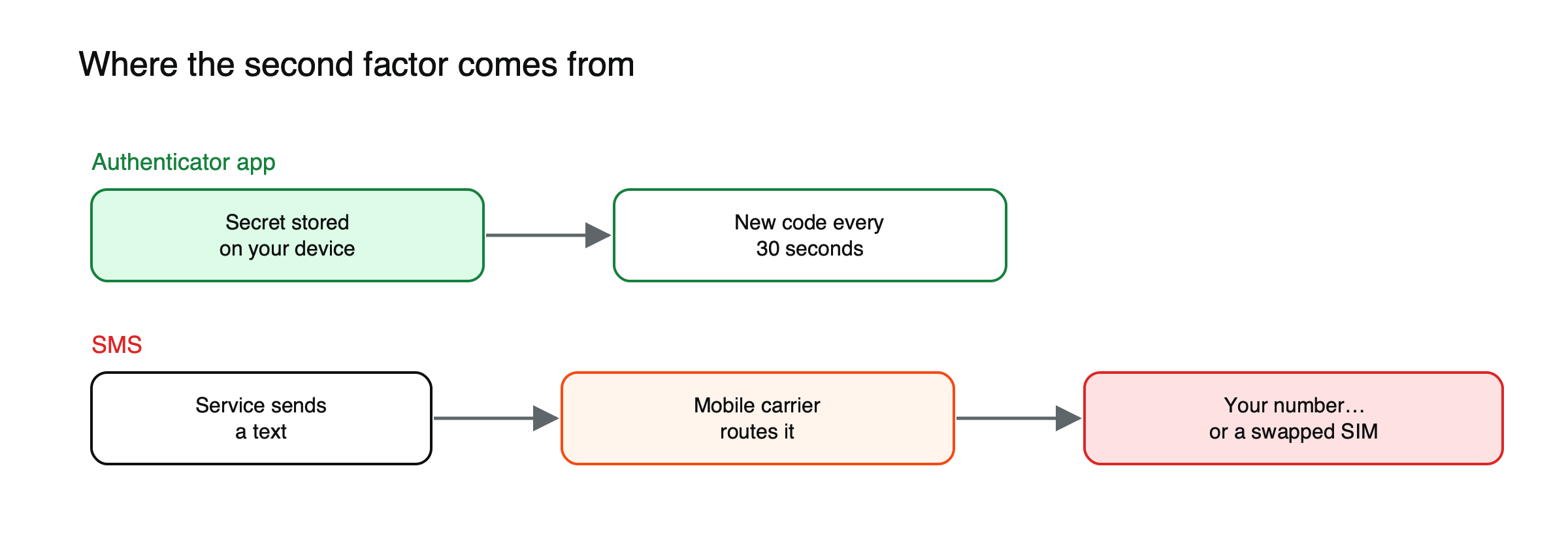
Figure: Where each kind of code comes from, and where it can be intercepted.
Where the app falls short
The app is safer against SIM swaps, but it is not phishing-proof: a fake login page can ask for your app code and use it instantly. If you lose your phone without backup codes, you can also lock yourself out. Hardware security keys and passkeys beat both, because they only work on the genuine site. See what a passkey is.
What an attacker needs in each case
| To bypass | Authenticator app | SMS |
|---|---|---|
| With your password alone | Not enough | Not enough |
| By taking over your phone number | Not enough | Enough |
| With a fake login page you type the code into | Enough, if used within seconds | Enough, if used within seconds |
| By stealing your unlocked phone | Enough | Enough |
The table shows why the app is a clear improvement over SMS, and also why neither stops a well-made phishing page. Only phishing-resistant methods, such as security keys and passkeys, close that last row.
Recovery options can undo strong 2FA
Switching your login to an authenticator app helps little if the account still lets anyone reset the password or the second factor by text message. Attackers who take over your number will simply use the recovery route instead of the login. After moving to an app, check each important account’s recovery settings, remove the phone number where you can, and rely on backup codes and recovery emails that are themselves well protected.
Choosing method by account
Put your strongest method, a security key or passkey, on your email and on any exchange holding significant funds. Use an authenticator app for other financial and important accounts. Keep SMS only where nothing else is offered. Matching the method to what an account protects gives most of the security benefit without making every login a chore.
Push approvals and the fatigue trick
Some services use push notifications instead of codes: a prompt appears on your phone and you tap to approve. It is convenient, but attackers who already have a password can trigger prompt after prompt, hoping you approve one by mistake or to make them stop. Number matching, where you type a number shown on the login screen into the app, makes this much harder. If you receive approval requests you did not start, deny them and change your password.
Backing up an authenticator app
The app’s codes come from secrets stored on your phone, so losing the phone can lock you out. Some authenticator apps offer encrypted cloud backup or export between devices, which makes recovery easier but means the secrets exist somewhere other than your phone. Others keep everything on the device only. Either approach works if you also save each service’s backup codes offline, which remain the most reliable way back in.
Switching from SMS to an app
- Install a reputable authenticator app from the official app store.
- In each account’s security settings, add the app by scanning the QR code, and confirm with a test code.
- Save the backup codes the service shows, offline.
- Only then remove SMS as a second factor and, where possible, as a recovery option.
- Start with email and exchanges, then work through other accounts.
A sensible goal is to finish the switch for your most important accounts in a single sitting, because a half-finished move can leave SMS active on exactly the account an attacker would choose. Once the core accounts are done, the rest can follow over the next week as you log in to each one, checking recovery settings at the same time and removing any old phone numbers you no longer need.
When SMS is still better than nothing
For accounts that offer no other option, SMS 2FA still stops attackers who only have your password, which covers a large share of automated attacks. Keep it on in those cases, protect your phone number with a carrier PIN, and push the service to support stronger methods.
What to do
- Switch from SMS to an authenticator app or security key where the service allows.
- Remove your phone number as a recovery option if the service lets you.
- Store backup codes offline.
- Ask your carrier for a port-out PIN or account lock.
For the basics, read what two-factor authentication is and how to build a crypto security routine.
This article is educational content and does not constitute financial, investment, legal or tax advice. Digital assets are volatile and you may lose the amount you invest.
Frequently asked questions
Which authenticator app should I use?
Any well-known app from an established developer works for standard codes. What matters more is that you download it from the official app store and keep backup codes for every account you protect with it.
Are security keys better than authenticator apps?
For phishing resistance, yes. A security key or passkey only works on the genuine site, so a fake login page cannot capture a usable code. Many people use a security key for their most important accounts and an app for the rest.
Sources
- Criminals Increasing SIM Swap Schemes (1,611 complaints, more than $68 million in 2021; SMS codes intercepted after SIM swaps; recommended alternatives) — FBI IC3, February 2022
- FBI: $68 million lost to SIM swapping attacks in 2021 (how SIM swaps bypass MFA) — The Record
- SIM swap fraud statistics (NIST restricts SMS one-time passcodes) — Message Central