
How to Speed Up a Stuck Bitcoin Transaction
A stuck Bitcoin transaction usually means the fee was too low. Learn how to check it, bump the fee with RBF or CPFP, and what to do if an exchange sent it.
A stuck Bitcoin transaction almost always means its fee rate was too low for current demand. This guide shows how to confirm that, then how to speed it up with replace-by-fee (RBF) from the sending wallet or child-pays-for-parent (CPFP) from the receiving side.
Step 1: Check what is actually happening
Copy the transaction ID (txid) from your wallet and paste it into a block explorer. Our guide to what a blockchain explorer is shows where to look.
You are checking three things:
- Is it in the mempool at all? If the explorer cannot find it, the transaction may never have been broadcast. Rebroadcasting from your wallet is the fix.
- What fee rate did it pay? Look for the figure in satoshis per virtual byte (sat/vB).
- What are recent blocks paying? If blocks are clearing at 20 sat/vB and yours pays 2 sat/vB, miners have no reason to pick it up until demand falls.
If your fee rate is close to what recent blocks are paying, patience is often the cheapest fix. Our guide to blockchain transaction fees explains why the rate moves.
Step 2: Decide whether to wait
A low-fee transaction is not lost. It sits in the mempool of nodes on the network until it confirms, is replaced, or is dropped. Bitcoin Core, the most widely used node software, drops unconfirmed transactions after 336 hours (14 days) by default, and nodes with full mempools drop the lowest-paying transactions first. Once a transaction is gone from most nodes, the coins are effectively back in your wallet’s control, though your wallet may need to rescan or rebroadcast to show it.
Waiting makes sense when you are not in a hurry and fees tend to fall at quieter times. If the payment is urgent, move on to a fee bump.
Step 3: Bump the fee with replace-by-fee (RBF)
RBF means sending a new version of the same transaction that spends the same coins with a higher fee. Miners prefer the better-paying version, and once it confirms the original becomes invalid.
How to do it. Many wallets show a “Bump fee,” “Speed up” or “Increase fee” button on unconfirmed transactions. You choose a new fee rate and sign again.
The rules. The replacement must pay a higher total fee and a higher fee rate than the original. Historically, transactions had to signal in advance that they could be replaced (BIP 125). Since Bitcoin Core 28.0, nodes accept replacements by default even without that signal, though your wallet still has to support creating one.
Worked example. The numbers are illustrative.
- Original: 141 virtual bytes at 2 sat/vB, a fee of 282 sats
- Current next-block rate: about 20 sat/vB
- Replacement: the same 141 vB at 20 sat/vB, a fee of 2,820 sats
You pay 2,538 sats more than the original. Only the replacement’s fee is ever paid, because only one version can confirm.
Step 4: Or pull it through with child-pays-for-parent (CPFP)
CPFP works from the other end. Someone who controls an output of the stuck transaction, usually the recipient or your own change output, spends it in a new “child” transaction with a high fee. Miners look at the two transactions as a package: to collect the child’s fee, they must also confirm the parent.
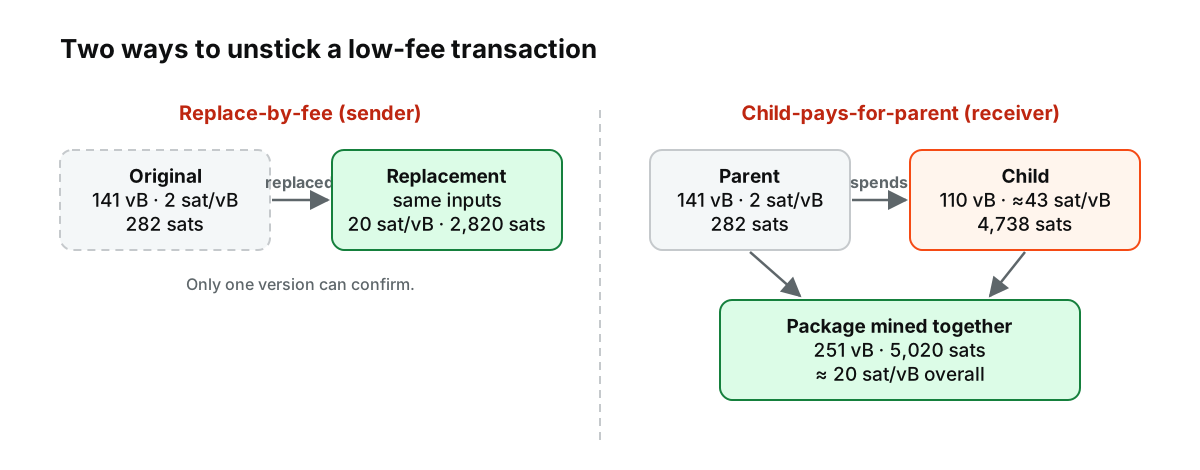
Figure: RBF and CPFP side by side, using the illustrative numbers from the worked examples.
Worked example. The numbers are illustrative.
- Stuck parent: 141 vB paying 282 sats (2 sat/vB)
- Child: 110 vB
- Target for the package: 20 sat/vB
- Package size: 141 + 110 = 251 vB, so the package needs 251 × 20 = 5,020 sats in total
- Child fee: 5,020 − 282 = 4,738 sats, which is about 43 sat/vB on its own
CPFP costs more than RBF for the same result, because you pay for the extra child transaction. It is still the only option when the sender cannot or will not replace the transaction.
RBF vs CPFP at a glance
| Replace-by-fee (RBF) | Child-pays-for-parent (CPFP) | |
|---|---|---|
| Who can do it | The sender | Whoever controls an output of the stuck transaction, usually the receiver |
| How it works | Re-sends the same payment with a higher fee | Adds a high-fee transaction that spends the stuck one |
| Total fee in the examples | 2,820 sats | 5,020 sats (282 + 4,738) |
| Wallet support needed | A “bump fee” option | The ability to spend an unconfirmed output |
| Best when | You sent it and your wallet supports RBF | You are the receiver, or the sender cannot act |
Step 5: If an exchange or platform sent it
You usually cannot bump a withdrawal sent by an exchange, because you do not control its keys. Share the txid with the platform’s support team through the official app or website and ask whether they can accelerate it. If you are the receiver of a stuck deposit, your platform will credit it only after it confirms; contact support only through official channels and never share your seed phrase or 2FA codes with anyone offering to “unstick” a transaction.
Some mining pools sell paid “transaction acceleration,” where they include your transaction in their own blocks. It can work, but it depends on that pool finding a block, and the cost can exceed a simple fee bump.
Step 6: Avoid it next time
- Check the fee before you send. Most wallets estimate a rate for your target confirmation time; at busy times, accept the higher estimate for urgent payments.
- Use a wallet that supports RBF. Having the “bump fee” option is worth more than shaving a few sats off the first attempt.
- Fewer inputs, smaller fee. A payment funded by many small coins takes more block space. Our explainer on UTXOs shows why.
- Send a test first for large or new transfers. Our checklist on how to withdraw crypto safely covers the full routine.
This article is educational content and does not constitute financial, investment, legal or tax advice. Digital assets are volatile and you may lose the amount you invest.