
What Is a SIM Swap Attack and How Do You Prevent It?
A SIM swap moves your phone number to a criminal's SIM so they receive your texts and 2FA codes. How the attack works, the warning signs and how to prevent it.
A SIM swap attack happens when a criminal gets your mobile carrier to move your number to a SIM card they control. Your calls and texts, including 2FA codes, then go to them, and they use that access to reset passwords and empty accounts. The FBI recorded more than $68 million in SIM swap losses in 2021.
How attackers choose their targets
SIM swapping takes effort, so attackers pick victims who seem worth it. People who post about their crypto holdings, share screenshots of balances or are publicly known to work in the industry are frequent targets. Leaked databases that link phone numbers with names, addresses and dates of birth give attackers the details they need to impersonate someone on a call. Keeping your number private, avoiding posts about how much you hold and using a separate number for financial accounts all make you a less attractive target.
Why a phone number is such a weak link
A phone number was never designed to prove identity, yet many services use it that way: to send login codes, to reset passwords and to confirm that a caller is the account holder. The number itself, though, is controlled by a mobile carrier and can be moved to a different SIM card by a customer service process. Anyone who can persuade or pay someone inside that process can take over your number without ever touching your phone. Every account that trusts your number then trusts the attacker too.
How the attack works
- Research: the attacker gathers your name, phone number and personal details from leaks, social media or phishing.
- The swap: they contact your carrier pretending to be you, or work with a corrupt insider, and ask for your number to be moved to a new SIM.
- Takeover: your phone loses service. The attacker requests password resets and SMS codes for your email, exchange and bank accounts.
- Theft: they change passwords and withdraw funds before you notice.
From 2018 to 2020, the FBI’s complaint center received 320 SIM swap complaints with losses of about $12 million. In 2021 alone it received 1,611, with losses of more than $68 million.
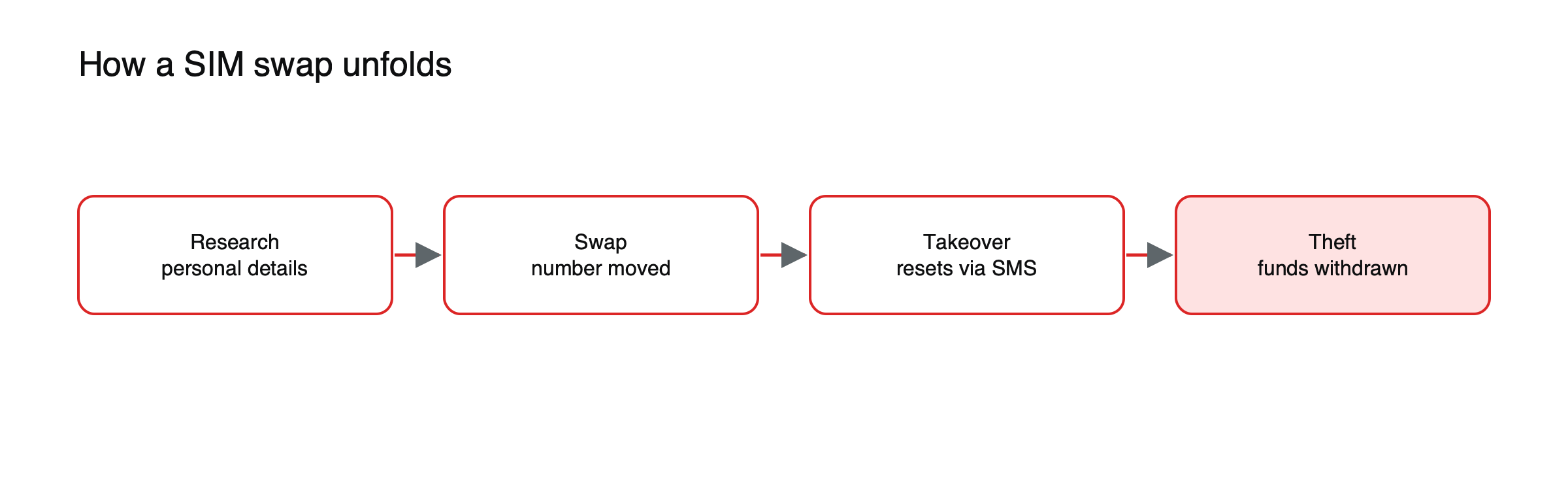
Figure: The four stages of a SIM swap attack.
Insiders and eSIMs
Not every swap starts with a convincing phone call. Some criminals pay carrier employees or retail staff to move numbers, which bypasses the security questions entirely. The spread of eSIMs, which can be moved between devices digitally, adds another route if a carrier’s online account or transfer process is weakly protected. Both are reasons to lock down your carrier account itself, not just your phone.
Warning signs
- Your phone suddenly shows “No service” or “SOS only” where it normally works.
- You receive messages about a SIM change or number transfer you did not request.
- You get password reset emails you did not ask for.
If this happens, contact your carrier immediately from another phone, then secure your email and financial accounts. See how to recover a hacked crypto account.
The first hour after a suspected swap
Speed matters, because attackers usually move within minutes of taking the number. Act at once on the first warning sign.
- Call your carrier from another phone and ask them to reverse the change and lock your number. Ask for the fraud or security team if possible.
- Secure your email first, from a trusted device: change the password, sign out of all sessions and check the recovery settings for changes.
- Lock down exchange accounts: change passwords, freeze withdrawals if the exchange offers it, and contact support through the official site.
- Review recent activity on financial accounts and look for new withdrawal addresses, API keys or forwarding rules in your email.
- Report the incident to your carrier in writing and to the police; in the United States, the FBI’s Internet Crime Complaint Center accepts reports at ic3.gov.
Carrier protections worth asking for
Most carriers offer some combination of a port-out or transfer PIN that must be given before a number can be moved, an account passcode required for changes in stores or by phone, and an option to lock the number against transfers altogether. Names differ by carrier and country, so ask specifically what stops your number from being moved or your SIM replaced without you. Write down the PIN and store it somewhere other than your phone. Some carriers also let you add a note to your account requiring extra verification for any change, or send alerts by email when a SIM change is requested. Turning those on gives you a chance to react before an attacker can use your number, which is often the difference between a scare and a loss.
How to prevent it
- Stop using SMS for 2FA on crypto and email accounts. Use an authenticator app, security key or passkey. See authenticator app vs SMS.
- Add a port-out PIN or account lock with your mobile carrier.
- Remove your phone number as a recovery method where possible.
- Limit personal details online, especially your phone number and date of birth.
- Use a withdrawal whitelist on exchanges so stolen access cannot send funds anywhere. See what a crypto address whitelist is.
For more protections, read how to build a crypto security routine.
This article is educational content and does not constitute financial, investment, legal or tax advice. Digital assets are volatile and you may lose the amount you invest.
Frequently asked questions
Can someone SIM swap me if I use an authenticator app?
They can still take your phone number, but they will not receive your authenticator codes, which live on your device. The danger comes from accounts that still accept SMS for login or recovery, so removing your number from those settings closes the gap.
Will my carrier refund losses from a SIM swap?
Carriers rarely cover crypto losses, and transfers on a blockchain cannot be reversed. Prevention, by locking your number and moving off SMS-based security, is far more effective than trying to recover funds afterwards.