
How to Contact OTCN Support Safely and Spot Impersonators
Use only official channels listed on otcn.com, never share passwords or 2FA codes, verify unexpected messages and report impersonators: contact support safely.
To contact OTCN support safely, use only the channels listed on the official otcn.com website or inside your client area, never share your password, two-factor codes or backup codes, treat unexpected messages offering help or investment returns as suspicious, and report anyone impersonating OTCN. Scammers often pose as support staff or account managers on social media and messaging apps.
[PRODUCT FACTS SHEET — Open decision 3: every OTCN-specific step, screen name, fee, limit and time in this article is a placeholder marked PFS and must be confirmed before publishing.]
Before you start
Bookmark the official website and note the support channels it lists. [PFS: official support channels, hours and verified social media accounts.]
Reaching the right people
Start contact yourself
Reach support through the website or client area rather than replying to unsolicited messages.
Protect your credentials
Real support staff never ask for passwords, 2FA codes or remote access to your device.
Verify before acting
Check any request to move money or change details through official channels.
What support can help with
Support teams typically help with account access, verification questions, deposits and withdrawals, platform issues and explanations of charges or statements. They cannot give personal investment advice, guarantee returns or recover losses from trades. Knowing what support can and cannot do helps spot impostors, who often promise exactly what genuine support never would. [PFS: OTCN support scope and hours.]
Preparing a request
Include your account number or registered email, a clear description of the issue, the dates and references of any transactions involved and screenshots if useful. Never include passwords, two-factor codes or full card numbers. A complete request usually gets a faster answer.
Warning signs of impersonators
- Contact through personal messaging accounts or social media direct messages.
- Promises of guaranteed or high returns.
- Pressure to act quickly or to deposit to a different account.
- Requests for codes, screen sharing or software installs.
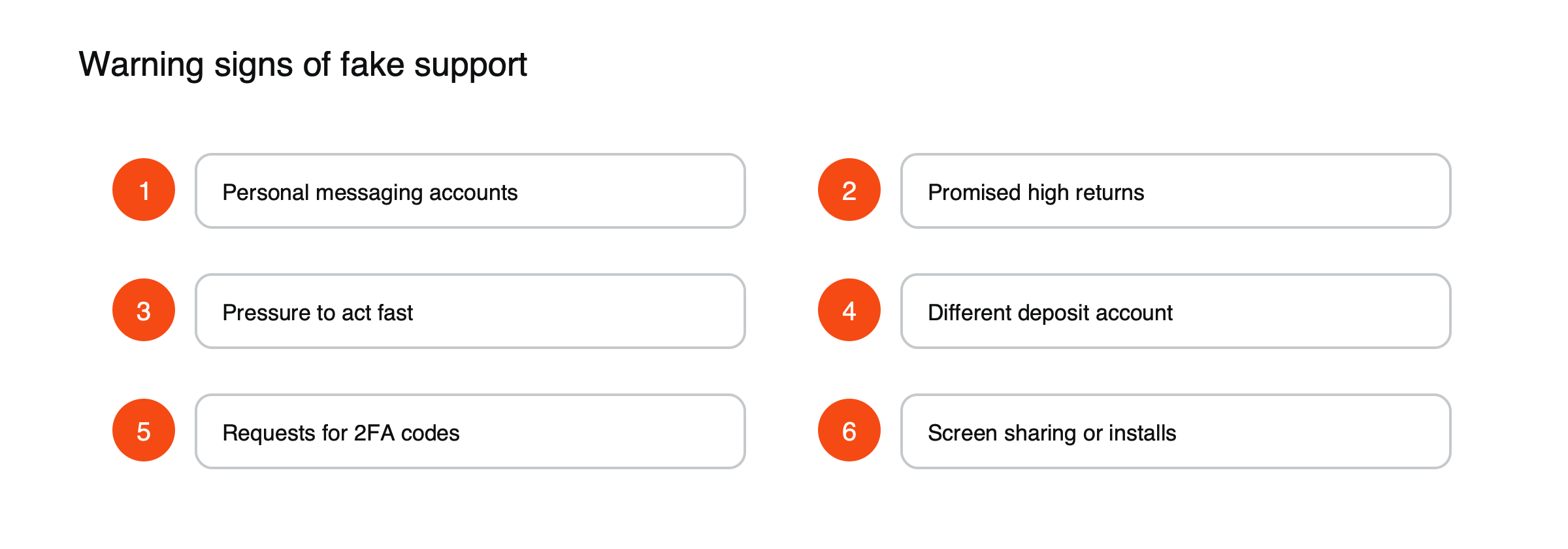
Figure: Signs of fake support.
An impersonation attempt, illustrated
Suppose a trader posts a question about a delayed withdrawal on social media. (Illustrative scenario.) Within minutes, an account using the broker’s logo sends a direct message offering help, asks the trader to install a screen-sharing app to “check the issue” and then asks for a two-factor code. Every step is a warning sign: genuine support does not approach clients through private messages, request remote access or ask for codes. The safest response is to stop replying, report the account and contact support through the official website.
Recovery scams
People who have lost money to fraud are often targeted again by so-called recovery services that promise to get the money back for an upfront fee. These offers are usually scams themselves. Report fraud to the police or national fraud reporting services instead.
If you think you’ve been targeted
Change your password, check two-factor settings and contact official support. See what to do if your account is hacked.
Report it
Report impersonators to OTCN and, where relevant, to the police or national fraud reporting services. [PFS: OTCN reporting address.]
Related security
See how to set up two-factor authentication on OTCN and how to open an OTCN account.
Fake apps and websites
Fraudsters create websites and apps with names and designs similar to genuine brokers, sometimes paying for search ads that appear above the real site. Download apps only from official app stores via links on the genuine website, check the web address carefully and bookmark the correct login page. See how to protect a crypto account from phishing.
Making a complaint
If support does not resolve an issue, regulated firms must have a formal complaints process with set response times. If a complaint remains unresolved, clients may be able to refer it to an independent ombudsman or the regulator, depending on the jurisdiction. [PFS: OTCN complaints procedure and applicable ombudsman or regulator.]
Protecting your data in conversations
When using live chat or email, share only what is needed to identify your account and the issue. Be cautious about sending documents by email unless support has asked for them through the secure client area. [PFS: secure document upload channel.]
Official social media accounts
Many firms run social media accounts for news and service updates, but impostors copy their names, logos and posts. Genuine accounts are listed on the official website, and genuine staff will not move conversations to private messaging apps to discuss your account. If a social media account contacts you first about your account, treat it as suspicious. [PFS: list of OTCN’s official social media accounts.]
Investment scams to know
Fraudsters use several common patterns: building a relationship online over weeks before introducing an investment opportunity, promoting fake trading platforms that show invented profits, posing as account managers who push for larger deposits, or offering to recover money lost to earlier scams. What they have in common is pressure, secrecy and promises that sound too good to be true. Regulators publish warning lists of firms operating without authorization.
Support in your language
Check which languages and hours the official support team covers before you need help. [PFS: OTCN support languages and hours.]
Common misreadings
- Believing a convincing logo proves an account is genuine.
- Assuming scammers only target inexperienced investors.
How to verify a message
If you receive a message that claims to be from your broker, do not click links or call numbers in it. Instead, log in to your account through your saved bookmark or official app and check for notifications there, or contact support through the channels listed on the official website. Compare email addresses and website domains character by character, because impostors often use addresses that differ by a single letter. [PFS: OTCN official email domains.]
Keep evidence
If you suspect fraud, keep screenshots of messages, usernames, phone numbers, website addresses and any payment details. This evidence helps support, banks and police act more quickly, and it may be needed if you try to recover funds through your bank.
Help for victims
Victims of investment fraud should contact their bank immediately, report the fraud to the police or the national fraud reporting service and warn others where safe to do so. Acting quickly gives the best chance of stopping further payments. Be wary of anyone offering to recover losses for a fee.
Requests for remote access
Fraudsters often ask victims to install remote-access software so they can “help” with an account. Once installed, the software lets them see the screen, read codes and move money. Genuine support teams do not need control of your device to solve account problems. If someone asks you to install software, end the conversation and contact official support yourself.
Calls from familiar-looking numbers
Phone numbers can be faked to look like a company’s real number. A call that appears to come from your broker is not proof that it does. If a caller asks for codes, passwords or payments, hang up and call back using the number on the official website.
Why traders are targeted
Trading accounts hold money that can be withdrawn, and traders are used to acting quickly on information, which scammers exploit by creating urgency. Public posts about trading activity also reveal who might have funds.
A support safety checklist
- I contacted support myself through official channels.
- I did not share passwords or codes.
- I did not install software at anyone’s request.
- I verified any request to change details or move money.
Data protection and your rights
In many jurisdictions, clients have rights over their personal data, such as the right to see what a firm holds about them and to have mistakes corrected. Firms must keep data secure and report certain breaches. If you receive a message that suggests your data has been exposed, contact the firm directly to confirm before acting. [PFS: OTCN data protection contact.]
Teaching others
Scams often target people through family and friends. Sharing a few simple rules, such as never giving codes to anyone and always starting contact through official channels, helps protect relatives who may be less familiar with online trading. Talking openly about scams also makes victims more likely to seek help quickly.
Reporting suspicious contact
Reporting impostor accounts and messages to the platform where they appear, and to the firm being impersonated, helps get them removed faster and protects other clients. Include screenshots and links, but do not engage further with the impostor. Most platforms have a simple reporting option on each profile.
Frequently asked questions
Will support ever contact me first?
Firms may send service messages, but genuine staff will not ask for passwords, codes or payments to unlock funds. If in doubt, contact support yourself through official channels.
What if I already shared a code?
Change your password immediately, reset two-factor authentication and contact support to secure the account.
[RISK WARNING — Open decision 2: approved CFD and leverage risk warning to be inserted here before publishing.]
This article is educational content and does not constitute financial, investment, legal or tax advice. Digital assets are volatile and you may lose the amount you invest.