
What Is Two-Factor Authentication?
Two-factor authentication adds a second proof, such as an app code or security key, to your password. How 2FA works, which types are safest, how to set it up.
Two-factor authentication (2FA) asks for a second proof of identity on top of your password, such as an authenticator app code, a security key or a text message. If someone steals your password, they still cannot get in without the second factor. For crypto accounts, where stolen funds are rarely recovered, it is a key protection.
How 2FA works
Most systems combine two of three kinds of proof:
- Something you know: your password.
- Something you have: your phone with an authenticator app, a hardware security key or a passkey on your device.
- Something you are: a fingerprint or face scan that unlocks a device.
After you enter your password, the service asks for the second factor before letting you in or approving sensitive actions such as withdrawals.
How time-based codes work
Authenticator apps usually use a published standard called TOTP, for time-based one-time password. When you set up 2FA, the service and your app agree on a shared secret, typically by scanning a QR code. From then on, both sides combine that secret with the current time to calculate the same six-digit code, which changes every 30 seconds. Nothing is sent over the network when the code is created, which is why it works in airplane mode. If your phone’s clock drifts far from the correct time, codes stop matching, so keeping automatic time settings on avoids puzzling login failures.
Types of 2FA, from strongest to weakest
- Hardware security keys and passkeys: resistant to phishing, because they only work on the real website. See what a passkey is.
- Authenticator apps: generate a new six-digit code every 30 seconds on your device.
- SMS codes: better than nothing, but vulnerable to SIM swapping. The FBI recommends stronger methods such as security tokens or standalone authenticator apps.
See authenticator app vs SMS for a direct comparison.
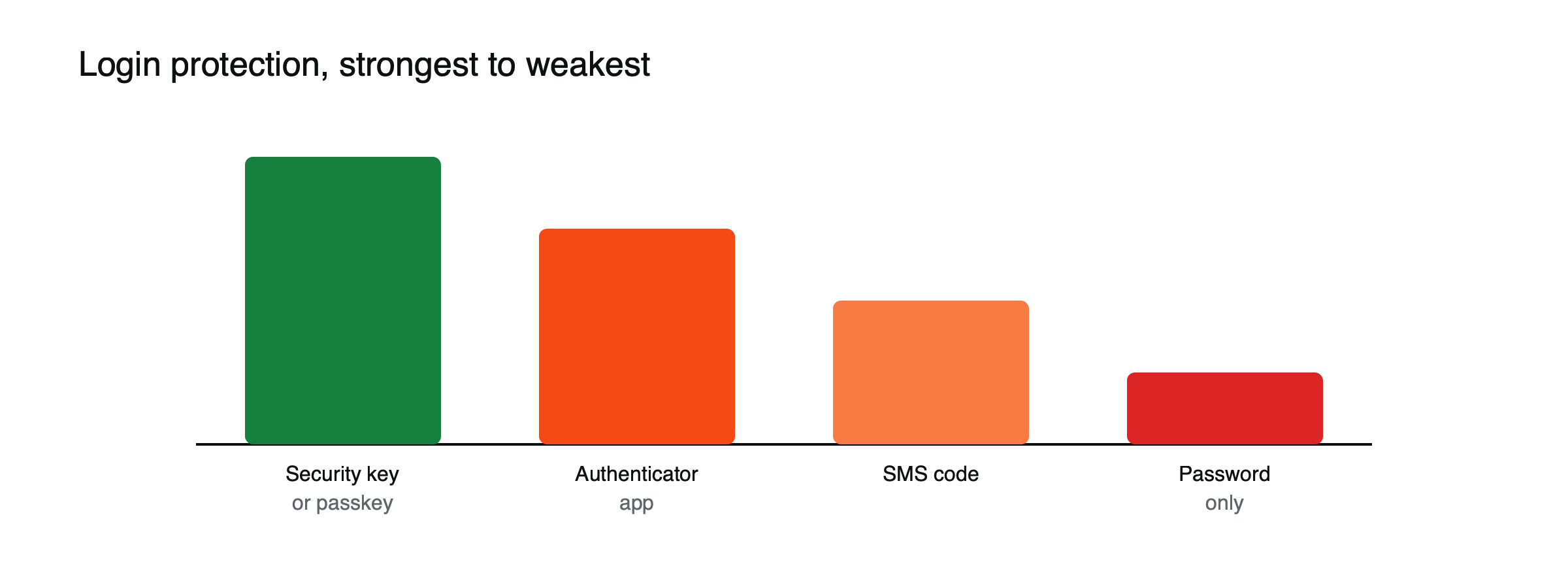
Figure: Relative strength of common login protections (qualitative ranking).
Why it matters for crypto
In 2021, the FBI’s Internet Crime Complaint Center received 1,611 complaints about SIM swapping, with losses of more than $68 million, as criminals took over phone numbers to intercept SMS codes. Crypto transfers are usually final, so preventing account takeover matters more than recovering from it.
From key fobs to passkeys
Second factors are older than crypto. Banks and companies once handed out small hardware tokens that displayed changing codes. Text-message codes spread as nearly everyone gained a mobile phone, and app-based codes followed as smartphones became universal. The newest step, passkeys and security keys based on industry standards, moves away from codes altogether: the device proves your identity to the genuine website using cryptography, so there is nothing for a phishing site to capture and replay. Security keys are small, inexpensive and last for years. Registering two of them, one carried daily and one kept at home as a spare, means losing a key never locks you out of the accounts that matter most.
Where to turn it on first
Not every account matters equally. A sensible order:
- Your main email, because almost every other account can be reset through it.
- Crypto exchanges and brokers, for logins and, where offered, for withdrawals.
- Your password manager, which holds the keys to everything else.
- Your mobile carrier account, where a strong PIN or passcode helps block SIM swaps.
- Cloud storage and backups, which may contain documents an attacker could use to impersonate you.
Backup codes
When you enable 2FA, most services offer a set of one-time backup codes. They let you log in if you lose your phone or security key, and each works only once. Treat them like a spare house key: print or write them down, keep them somewhere private and separate from your phone, and never store them in the same email account they protect. Without them, losing your second factor can mean days or weeks of account recovery.
2FA on exchanges: logging in vs moving money
Many exchanges let you require a second factor not just at login but for specific actions: withdrawals, adding a new withdrawal address, changing security settings or creating API keys. These checks matter most, because an attacker who gets past the login still has to clear them to take funds. Combine them with an anti-phishing code, a personal phrase the exchange includes in genuine emails, and a withdrawal address whitelist, and a stolen password alone becomes far less useful.
How to set it up well
- Use an authenticator app or security key instead of SMS where offered.
- Save backup codes offline, separate from your phone.
- Turn on 2FA for your email too, since email resets can bypass other protections.
- Combine it with a withdrawal address whitelist where available. See what a crypto address whitelist is.
What 2FA cannot stop
Two-factor authentication blocks attackers who have only your password. It does much less against attacks that capture the second factor in the moment. Real-time phishing sites pass your password and code straight to the real service and log in as you within seconds. Malware on your computer can steal the session cookie that keeps you logged in, letting an attacker skip the login entirely. And if your phone itself is compromised or stolen while unlocked, an authenticator app on it offers little protection. These limits are why phishing-resistant methods, careful link habits and device security matter alongside 2FA.
2FA stops many attacks but not all: phishing sites can trick you into entering a code in real time. Read crypto account phishing protection and how to build a crypto security routine.
This article is educational content and does not constitute financial, investment, legal or tax advice. Digital assets are volatile and you may lose the amount you invest.
Frequently asked questions
Is a passkey the same as 2FA?
A passkey replaces the password with a cryptographic key stored on your device and unlocked by your fingerprint, face or PIN. Because it works only on the genuine website, it resists phishing better than codes. Many services treat it as a strong sign-in method on its own or alongside other factors.
What happens if I lose my phone?
Use your backup codes to log in, then set up 2FA again on a new device. If you have no backup codes, you will need the service’s account recovery process, which can take time and identity checks. That is why storing backup codes offline matters.
Sources
- Criminals Increasing SIM Swap Schemes (1,611 complaints and more than $68 million in 2021; use security tokens or standalone authenticator apps) — FBI IC3, February 2022
- Smart Contract Interaction Security (phishing and signature risks beyond passwords) — Security Alliance
- RFC 6238: TOTP, time-based one-time password algorithm — Internet Engineering Task Force