
What Is a Wallet Drainer?
A wallet drainer is a phishing kit that tricks you into signing a transaction or permission that empties your wallet. How drainers work and how to defend.
A wallet drainer is phishing software, usually placed on a fake or hacked website, that tricks you into signing a transaction or permission that lets attackers move your tokens. You never reveal your seed phrase; you simply approve the wrong thing. Scam Sniffer counted about $494 million stolen by drainers in 2024 from more than 332,000 wallets.
How drainers work
- Bait: a fake airdrop, mint, claim page or a lookalike of a real app, promoted through ads, hacked social accounts or messages.
- Connect: you connect your wallet, which by itself does not move funds.
- Sign: the site asks for a signature. It may be an approval, a «Permit» signature or a request that hands over control of a contract, often presented as a harmless login.
- Drain: once signed, the drainer moves your tokens to the attacker, often within seconds.
How big the problem is
In 2024, most large drainer thefts used Permit signatures (56.7%) or ownership-change signatures (31.9%), according to Scam Sniffer.
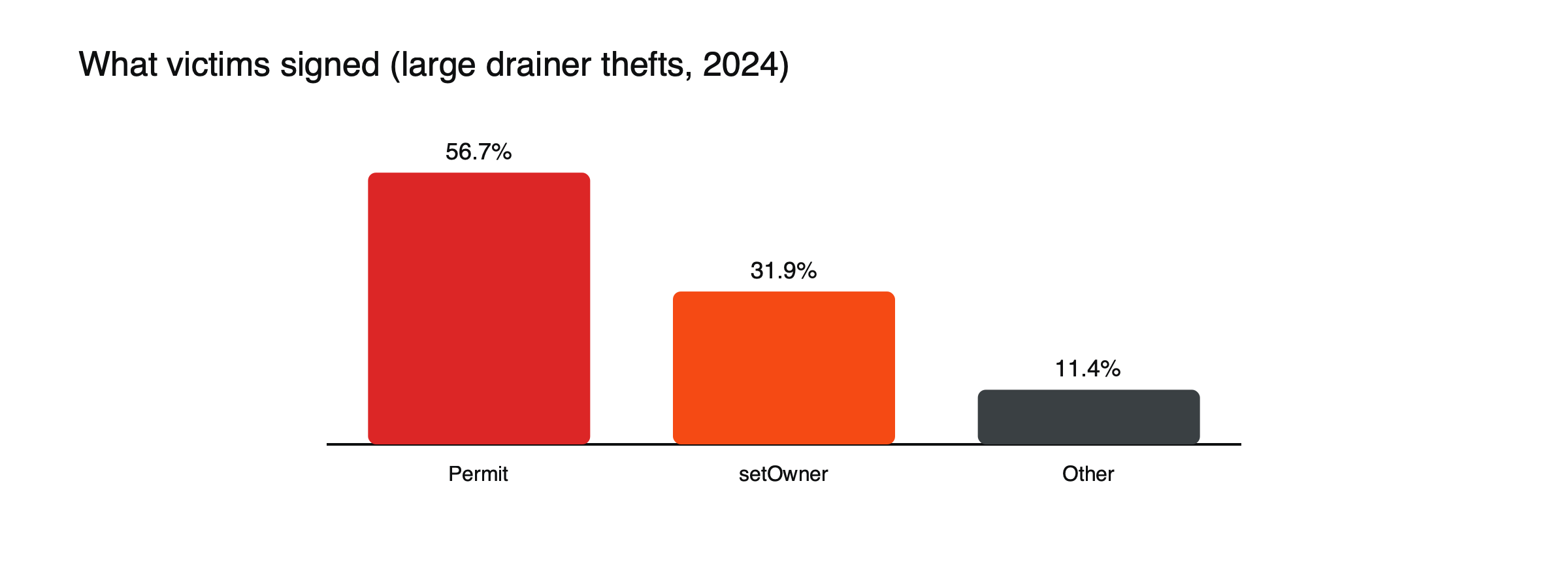
Figure: Signature types behind large drainer thefts in 2024. Source: Scam Sniffer via BleepingComputer.
Why signatures are dangerous
A Permit signature is created off-chain, costs no gas and can look like a simple message, yet it authorizes someone else to spend your tokens. Many users treat it as harmless because no transaction appears in their wallet until the theft. In August 2024, one victim lost about $55 million in DAI after signing an ownership-change request.
Three kinds of permission, in plain terms
- Approve: an on-chain transaction that lets a specific contract spend a token from your wallet, often in unlimited amounts. Legitimate apps use it all the time, which is why it is easy to abuse.
- Permit: the same permission granted through an off-chain signature. It costs nothing and does not show up as a transaction, so it feels like signing a message, but the attacker can submit it later and spend your tokens.
- Set approval for all: a permission for NFT collections that lets an operator move every item you own in that collection.
Each is a normal tool in the right hands and a complete handover in the wrong ones. The question to ask is always: who is the spender, and do I recognize them?
A drain in thirty seconds
Imagine a message announcing a surprise airdrop for holders of a popular token, with a link to claim. (Illustrative scenario.) The site looks like the project’s own and asks you to connect your wallet, which is harmless. It then asks you to «sign to verify eligibility.» The request is a Permit signature naming an unfamiliar address as spender for your stablecoins. You sign, nothing seems to happen, and the page says the claim is processing. Within seconds, a transaction you never saw moves your stablecoins out. By the time you check your balance, the funds have been split across several addresses.
Drainers as a business
Drainers are rarely built by the people who use them. Developers sell or rent drainer kits to affiliates, who run the phishing campaigns, and the two sides split the proceeds. The kits include fake site templates, tools to detect the most valuable tokens in a wallet and code to move funds instantly. This industrial setup is why the same tricks appear across thousands of sites, and why shutting down one site does little.
Who gets targeted
Drainer campaigns go where valuable wallets gather. They impersonate popular projects on social media, often through hacked official accounts, buy search ads that lead to lookalike sites and post fake announcements in community chats. Holders of large stablecoin balances, NFT collectors and people who regularly try new applications are frequent targets, because their wallets are both valuable and used to signing requests. A single large victim can be worth more to attackers than thousands of small ones, which is why the biggest losses tend to come from experienced users caught off guard rather than beginners. Attackers also reuse the same domain names with small spelling changes, so checking the address bar letter by letter is worth the few extra seconds it always takes.
Warning signs
- A site you reached through an ad, a direct message or a surprise token in your wallet.
- Urgency: «claim in the next 10 minutes.»
- A signature request on a site where you only expected to view something.
- Wallet warnings that a site or request is malicious.
If you have already signed something bad
Act immediately. Use a token approval checker to revoke permissions for the suspicious spender, then move any remaining assets to a new wallet created with a fresh seed phrase, since you cannot know what else was exposed. Revoking helps only for permissions that have not yet been used; funds already moved cannot be pulled back. Report the address to the platforms involved and be wary of anyone who contacts you offering to recover the funds, which is a common follow-up scam.
How to protect yourself
- Reach apps only through bookmarks or official documentation.
- Read every signature request; if it mentions Permit, approve, setApprovalForAll or ownership, check the spender address.
- Keep most funds in a wallet you never connect to new sites.
- Revoke old approvals regularly. See how to use a DEX for the first time.
- Ignore unknown tokens and airdrops that appear in your wallet.
For related scams, read what address poisoning is and crypto account phishing protection. For wallet basics, see what a crypto wallet is.
This article is educational content and does not constitute financial, investment, legal or tax advice. Digital assets are volatile and you may lose the amount you invest.
Frequently asked questions
Can a wallet drainer steal funds if I only connected my wallet?
Connecting alone shares your address and balances, not the ability to move funds. The danger starts when you sign a transaction or message. Still, disconnecting from sites you no longer use is good practice.
Do hardware wallets stop drainers?
Not on their own. A hardware wallet signs whatever you approve. It helps when its screen clearly shows what you are signing and you read it, which is why signing complex requests blindly defeats much of the protection.
Sources
- Cryptocurrency wallet drainers stole $494 million in 2024 (more than 300,000 addresses; Permit 56.7%, setOwner 31.9%) — BleepingComputer, January 2025
- Scam Sniffer 2024: Web3 Phishing Attacks (332,000 wallets; $55 million DAI setOwner case) — Scam Sniffer via DeFiHackLabs
- Token Approval (unlimited approvals; fake frontends) — Spark